
Marketplace export
Export your cards to Whatnot, eBay, TikTok Shop and Card Ladder
PCVault builds a ready-to-upload CSV from the cards you pick. Filter or select a lineup, choose Whatnot, eBay, TikTok Shop or Card Ladder, set a start price, and download. Categories, conditions, grades, titles, descriptions and photo links are filled in. You then upload the file on the marketplace yourself.
One lineup, four export files, no retyping.
Last reviewed
How it works
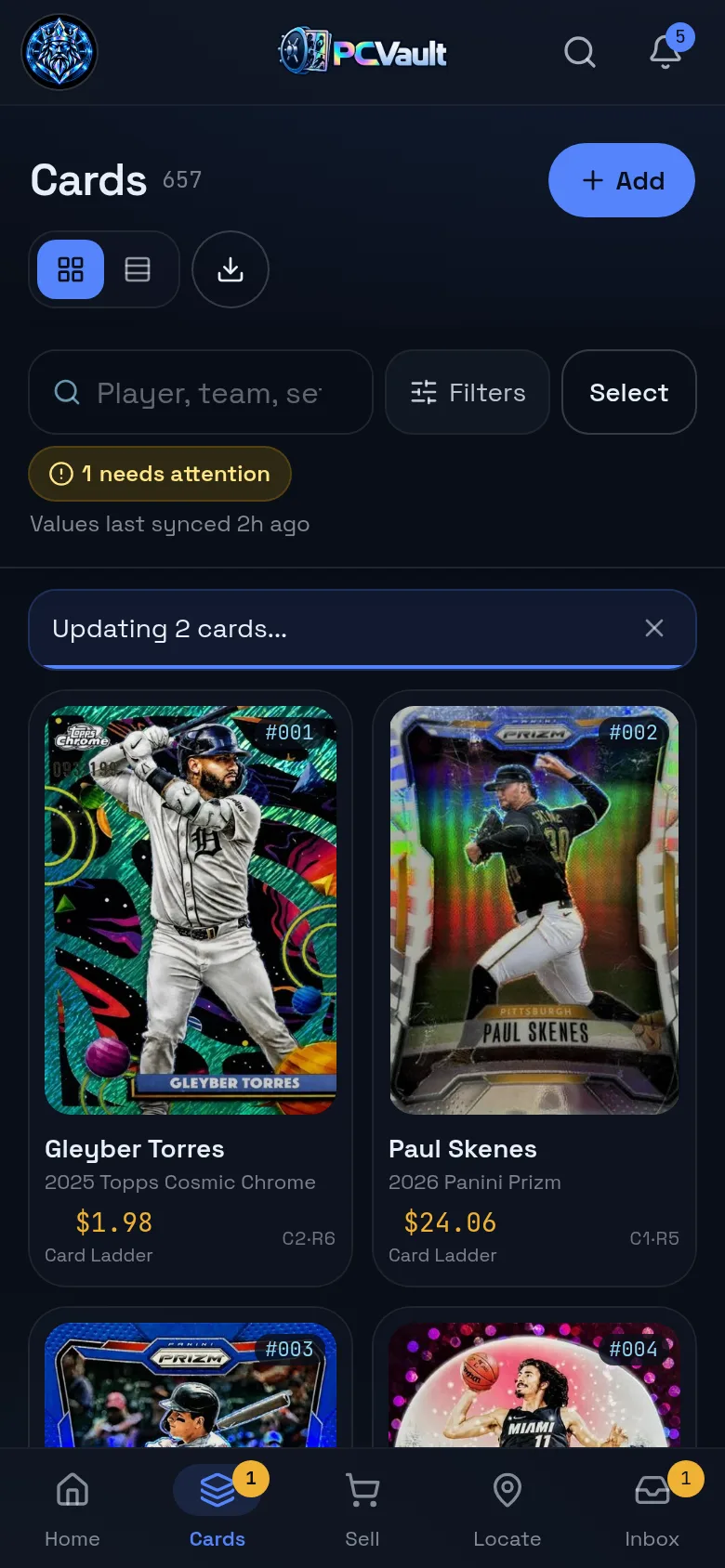
Pick tonight's lineup
- Search and filter your cards
- Tap Select, or Export all shown cards
- Select all or pick cards one by one
Choose the marketplace
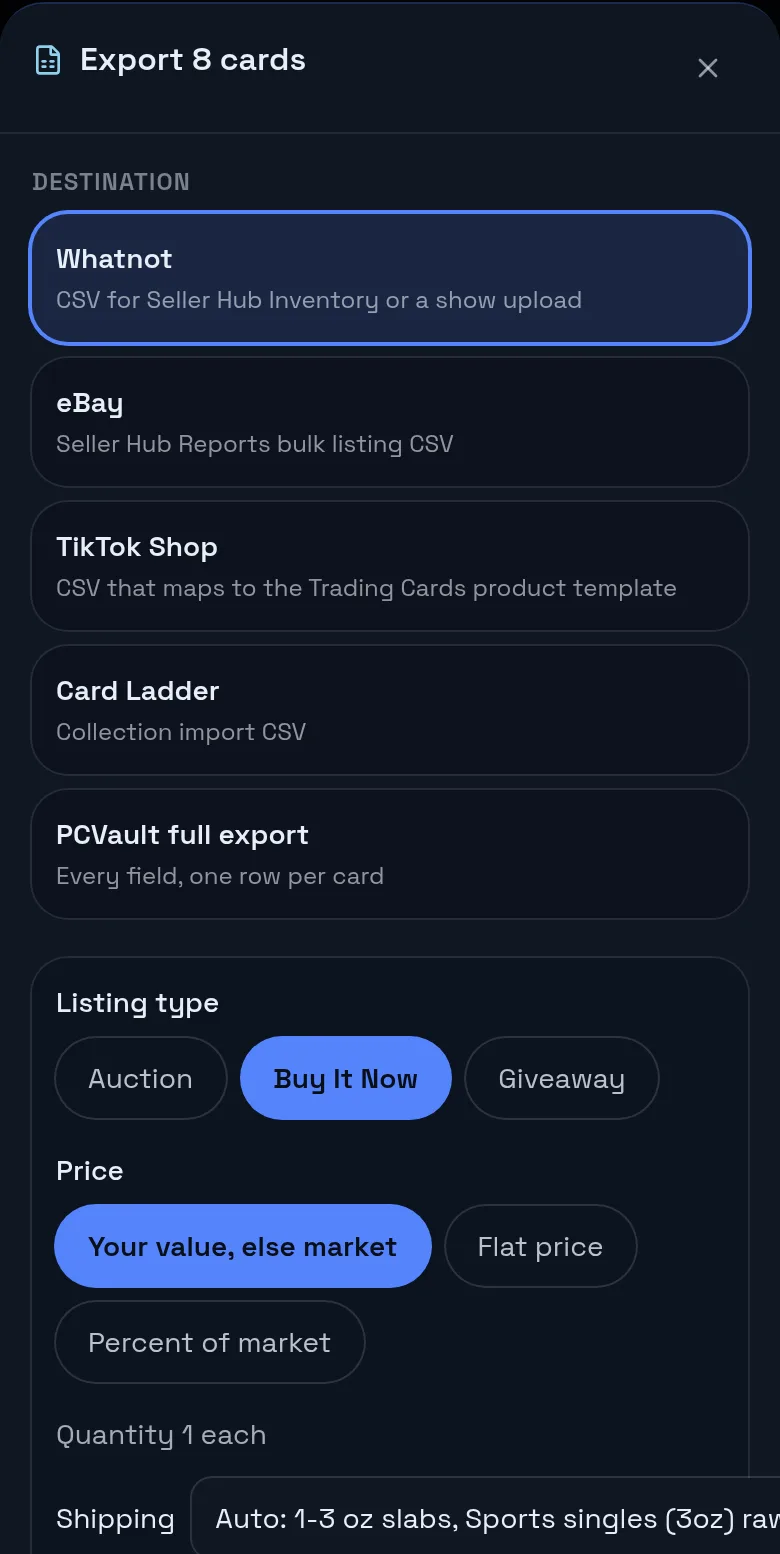
- Whatnot, eBay, TikTok Shop or Card Ladder
- Auction, Buy It Now or Giveaway where offered
- Your value, a flat price or a percent of market
Download and upload
- The CSV downloads to your device
- Titles and descriptions built from card details
- You upload it on the marketplace
What you get
Four export formats
Whatnot, eBay, TikTok Shop and Card Ladder, plus a full PCVault export.
Categories mapped
Sports, trading card game and non-sport cards each get their category.
Grades and conditions
Graded or raw conditions, grader, grade and cert number where the file allows.
Photo links
Permanent pcvaults.com image links the marketplace can fetch.
Start price options
Your value, a flat price or a percent of market with a floor.
SKU is your code
Every row carries the card's PCVault code so you can find it after the sale.
Export cards to Whatnot
The Whatnot file fills Category, Sub Category, Title, Description, Quantity, Type, Price, Shipping Profile, Offerable, Hazmat, Condition, SKU and up to 8 image links. Sports cards go under Sports Cards with a sport sub category such as Baseball Singles, and trading card game and non-sport cards get their own categories.
Graded cards are listed as Graded. Raw sports cards map to Raw - Near Mint or Better, Raw - Excellent, Raw - Very Good or Raw - Poor from the condition you saved. Choose Auction, Buy It Now or Giveaway, and turn on Accept offers for Buy It Now. Shipping can be set automatically, 1-3 oz for slabs and Sports singles (3oz) for raw cards, or picked from the Whatnot profiles.
On the Whatnot side
- 1.Open Whatnot Seller Hub in a desktop browser.
- 2.Go to Inventory or a scheduled show and upload the CSV.
- 3.Review the listings before you go live.
eBay bulk listing CSV for sports cards
The eBay file is a Seller Hub Reports bulk listing CSV. Each row is an Add action with your code as the custom label, a category for sports, trading card game or non-sport cards, a title up to 80 characters, start price, quantity 1 and up to 12 photo links in one field.
Graded cards use the graded condition with grader, grade and cert number descriptors. Raw cards use the ungraded condition with a card condition descriptor. Item specifics include sport, player, season, manufacturer, set, card number, parallel, card name, league and team. Auction listings run 7 days and fixed price listings are Good 'Til Cancelled.
On the eBay side
- 1.Open Seller Hub Reports and upload the file as a bulk listing.
- 2.Add your shipping, payment and return policies, which the file does not set.
- 3.Review and publish.
TikTok Shop trading cards CSV
The TikTok Shop file fills Identifier Code, Product Name, Product Description, Price, Quantity, Brand, Category and up to 9 image links. The category is Collectibles > Trading Cards and every card is listed at a set price.
On the TikTok Shop side
- 1.Open Seller Center, then Products, Bulk Action, Add Products.
- 2.Download the Trading Cards template.
- 3.Paste the PCVault columns into it and upload.
Export to Card Ladder
The Card Ladder file uses Card Ladder's collection import columns: player, year, set, variation, number, category, condition, cert number, quantity, value, notes, sold date and price, plus front and back image links. Use it to add cards to Card Ladder that you track in PCVault. It is on the Collector plan and up.
Live demo
Your inventory
Filter, select and export from the real Cards screen with @founder's cards. Demo, nothing is saved.
The real admin screens with @founder's For Sale cards. Demo, nothing is saved.
Before and after
Before
- Typing every listing by hand
- Looking up categories and condition codes
- Uploading photos one by one
With PCVault
- One CSV per marketplace
- Categories and conditions filled in
- Photo links in every row
Questions
How do I bulk upload sports cards to Whatnot?
In PCVault, filter or select the cards, tap Export and choose Whatnot. Pick Auction, Buy It Now or Giveaway, a price option and a shipping profile, then download the CSV. Upload it from a desktop browser in Whatnot Seller Hub, under Inventory or a scheduled show.
Does the eBay file set the category and grade?
Yes. Each row gets a sports, trading card game or non-sport card category, a graded or ungraded condition, and item specifics such as player, season, set, card number, parallel, grader, grade and cert number. Auction rows run 7 days and fixed price rows are Good 'Til Cancelled.
How does the TikTok Shop export work?
PCVault writes a CSV with product name, description, price, quantity, category Collectibles > Trading Cards and up to 9 image links. In Seller Center, go to Products, Bulk Action, Add Products, download the Trading Cards template and paste these columns into it.
What start price options are there?
For Whatnot, eBay and TikTok Shop you can use your own value or the market value, one flat price for every card, or a percent of market with an optional floor. Giveaway listings are always 0. Quantity is 1 per card.
Which plan do I need?
Whatnot, eBay and TikTok Shop exports are on the Vendor plan and up. The Card Ladder export and the full PCVault export are on the Collector plan and up.
Are my photos included?
Yes. Photo columns use permanent pcvaults.com image links, so the marketplace can fetch them. Whatnot gets up to 8 images, eBay up to 12 and TikTok Shop up to 9, starting with the front and, if you leave the option on, the back.
Keep exploring
Start free with 15 active cards
Upgrade when you need more cards, selling tools or staff logins.
Create your account