
Sharing and videos
Share your card collection, a single card or a video
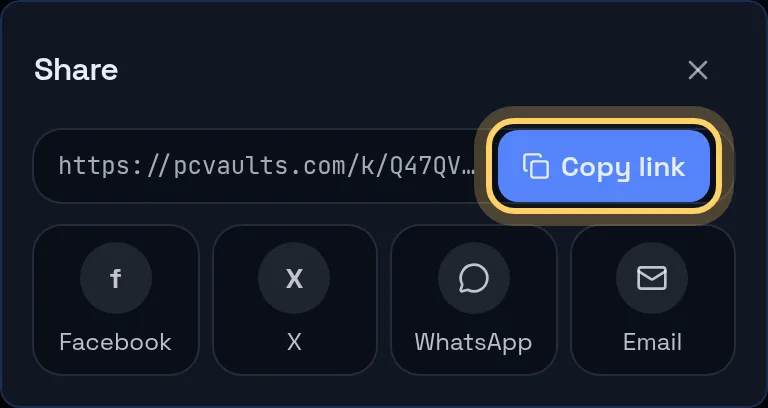
Every PCVault vault and card has a public link with its own preview image. On a phone, Share opens your phone's share sheet. On a computer you get Copy link plus X, Facebook, WhatsApp and Email. Make video turns up to 10 cards into a vertical video you download or share as a file.
One link for your vault, one for each card, and videos to post.
Last reviewed
How it works
Share your vault
- Share on your public page
- Phone share sheet or Copy link
- Preview with your name and card count
Share a card
- Share on any card page
- Permanent card link
- Preview with photo, grade and value
Make a video
- Select 1 to 10 cards
- Vertical 1080 by 1920, 15 to 40 seconds
- Download it or share the file
What you get
Copy link
On every share panel, with a confirmation when copied.
X, Facebook, WhatsApp, Email
Direct buttons on a computer.
Phone share sheet
On a phone, Share opens the apps you have installed.
Vault and card QR
Save the vault QR from Settings; card QRs print on labels.
Cost stays private
Previews and videos never show what you paid.
Selected cards
Visitors can share a set of cards they picked on your page.
Link previews for vaults and cards
When a vault link is posted, the preview image shows your name, @handle, avatar, number of cards and pcvaults.com/@handle. The collection value only appears if you chose to show it on your profile.
A card link previews the front photo, player, set, grade, a For Sale or Sold tag and the market value, which is left off personal collection cards. Purchase price, cost basis and profit are never part of any preview.
Make video for TikTok, Reels and Shorts
Select 1 to 10 cards on the Cards screen and tap Make video. Pick Showcase, or For Sale with prices set as a percent of market value with your pricing minimums applied, and 2, 3 or 4 seconds per card. The time per card is adjusted so the video stays between 15 and 40 seconds.
The video opens with your avatar, name, @handle, vault link and QR, shows each card's front and back with player, set, grade, market value and, for For Sale, the price plus a QR to the card, and ends with See the whole collection and your link.
It is made in your browser as MP4, or WebM where the browser cannot make MP4. Download it, or tap Share to send the file where your phone supports sharing files. Recent videos are kept for 7 days. Make video is on the Collector plan and up.
Which platforms get what
Direct buttons: X, Facebook, WhatsApp and Email, on a computer. Phone share sheet: any app installed on your phone. Copied link: Instagram bio or story, Discord, forums or anywhere else. Video file: TikTok, Instagram Reels and YouTube Shorts, uploaded or shared by you.
Your vault on stream
There is no overlay widget. Copy your vault link or save the vault QR as an image from Settings and add it to your streaming software as an image or text source.
Live demo
Pick cards for a video
The real Cards screen with @founder's cards. Demo, nothing is saved.
The real admin screens with @founder's For Sale cards. Demo, nothing is saved.
Before and after
Before
- Screenshots of a spreadsheet
- Editing a card video by hand
- Typing your link out on stream
With PCVault
- A link with a real preview
- A video made from your cards
- A QR you can put on screen
Questions
How do I share my sports card collection on Instagram?
Instagram has no direct button in PCVault. On a phone, tap Share on your vault and pick Instagram from your phone's share sheet if it is offered, or copy the link and paste it in your bio or story. For a post or Reel, use Make video and share or upload the video file.
What does the link preview show?
A vault link shows your name, @handle, card count and, only if you turned on showing your value, the collection value. A card link shows the front photo, player, set, grade, a For Sale or Sold tag and the market value. What you paid is never in a preview.
How do I make a sports card video for TikTok?
In Cards, select 1 to 10 cards and tap Make video. Choose Showcase or For Sale with prices and 2, 3 or 4 seconds per card. PCVault makes a 1080 by 1920 video of 15 to 40 seconds in your browser, which you download or share to TikTok as a file. Make video is on the Collector plan and up.
Which apps get a direct share button?
On a computer, X, Facebook, WhatsApp and Email have buttons, plus Copy link. On a phone, Share hands the link to your phone's own share sheet, so any app installed there works. TikTok, Instagram and YouTube get the video file, not a button.
Where do I get the QR code for my vault?
Your vault link and its QR code are in Settings, with Copy and a button to save the QR as an image. Each card's QR is printed on its label and opens its permanent card page.
Is there a stream overlay?
There is no overlay widget. Streamers put the vault link or the saved vault QR image into their own streaming software so viewers can browse while they talk.
Keep exploring
Start free with 15 active cards
Upgrade when you need more cards, selling tools or staff logins.
Create your account